Why Commenting Beats Posting on LinkedIn: A 10-Minute Daily Comment Routine
Commenting puts you in front of an audience that has already gathered. Here's why it beats posting when your reach is small, what a good comment looks like, and a paced 10-minute daily routine you can actually keep.

Most LinkedIn advice starts with "post more." But if your posts reach a few hundred people, posting more mostly means talking to the same few hundred people more often.
Commenting works differently. When you leave a thoughtful comment on a post that is already doing well, you're in front of an audience that has already gathered, on a topic you chose, next to a creator your buyers already trust. The reach is borrowed, but the attention you earn is yours: readers who like your comment click your name, visit your profile, and some of them follow or connect.
The catch is time. Doing this properly takes close to an hour a day: finding the right posts, reading them, writing something useful, replying to replies. Most people start strong and quietly stop in week two.
This guide covers why commenting outperforms posting when you're still building reach, what a comment that earns profile visits looks like, and a 10-minute daily routine built on CrossLike's Engagement Engine, with you approving every comment.
Why commenting beats posting when your reach is small
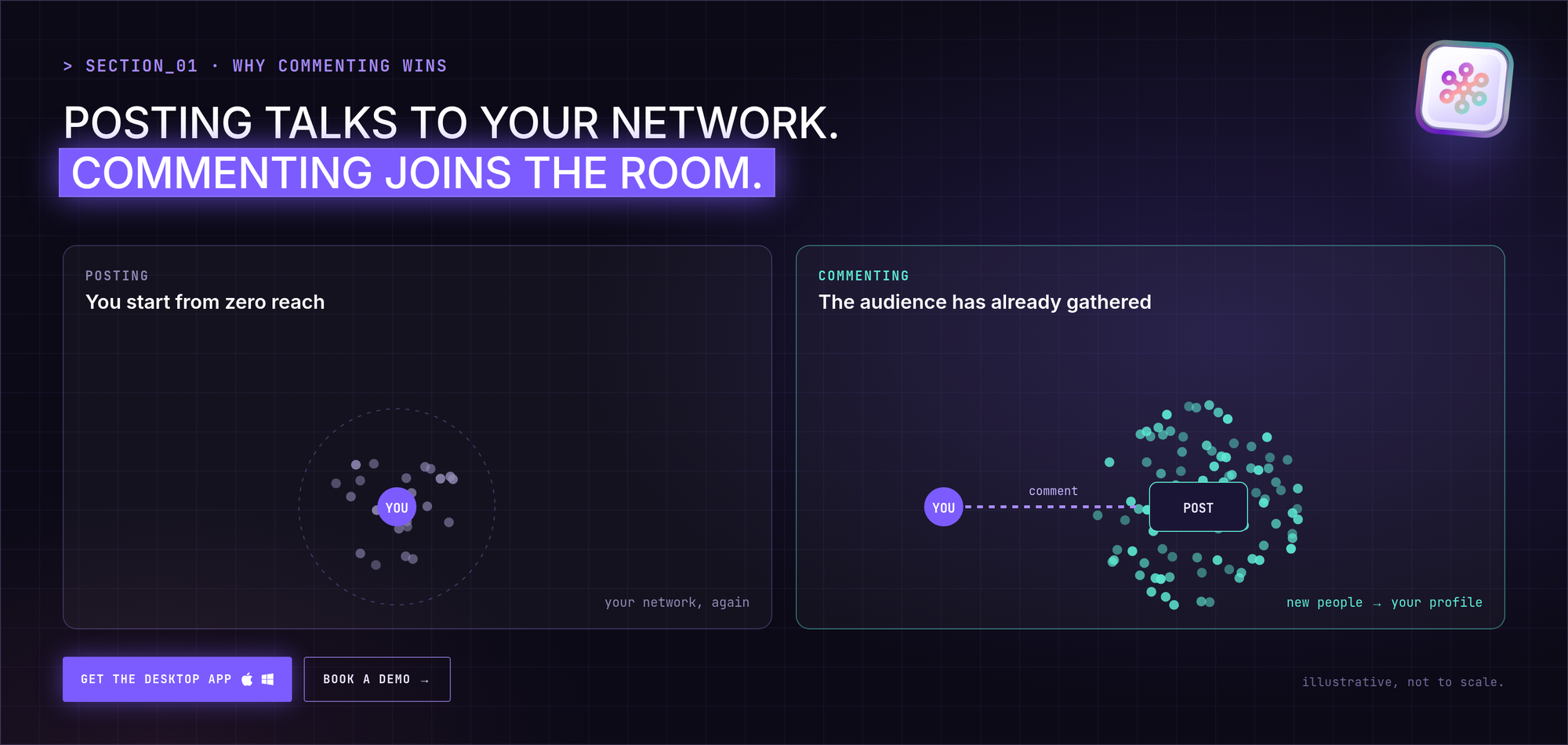
- The audience already exists. A post with strong engagement has already been distributed. Your comment rides on that distribution instead of starting from zero.
- You choose the room. You decide which creators, topics and threads you appear in. With posting, the algorithm decides who sees you.
- It builds familiarity before you ask for anything. People who've seen your name three times under posts they care about are much more likely to accept a connection request.
- It feeds your own posts. Every new follower you earn through comments is one more person who sees your next post in the first hour, which is when momentum matters most.
Posting still matters. It's what people find when they land on your profile. But when your reach is small, commenting is the faster way to grow it.
Posting is broadcasting to the people you already have. Commenting is walking into a room where your buyers are already listening.
What a comment that earns profile visits looks like
A comment earns a click when it adds something the post didn't have. A useful default structure:
- Your point first. Agree, disagree or extend, with a specific reason.
- One concrete detail. A number, an example, a mistake you made, a tool you used.
- A question that invites a reply. Replies push the thread up and bring the author back to you.
Two sentences is often enough. Here's the difference in practice:
| Weak comment | Strong comment |
|---|---|
| "Great post, thanks for sharing!" | "The part about replying in the first hour matches what we saw: threads we answered within 60 minutes kept getting comments the next day. Do you see the same on carousels?" |
| "So true 👏" | "I'd push back a little: for early-stage founders, one sharp post a week beat daily posting for us. What made daily work for you?" |
| "Agree 100%." | "We tried this with our sales team and the hard part wasn't writing, it was picking which 10 posts to show up on. How do you choose?" |
Rule of thumb: if your comment would make sense under any post, it's too generic. It should only make sense under this one.
Who to comment on
Not every popular post is worth your time. Prioritize:
- Creators your buyers follow, not just big names in your industry.
- Posts in the first few hours, when new comments still get seen and replied to.
- Threads where you have a real opinion. If you have nothing to add, skip it.
- Your own comment section. Replies under your own posts count too, and they keep your threads alive.
Build a short watchlist of 20–40 people and review it monthly. Remove people whose audience never engages back and add people your recent warm leads follow.
The 10-minute daily comment routine
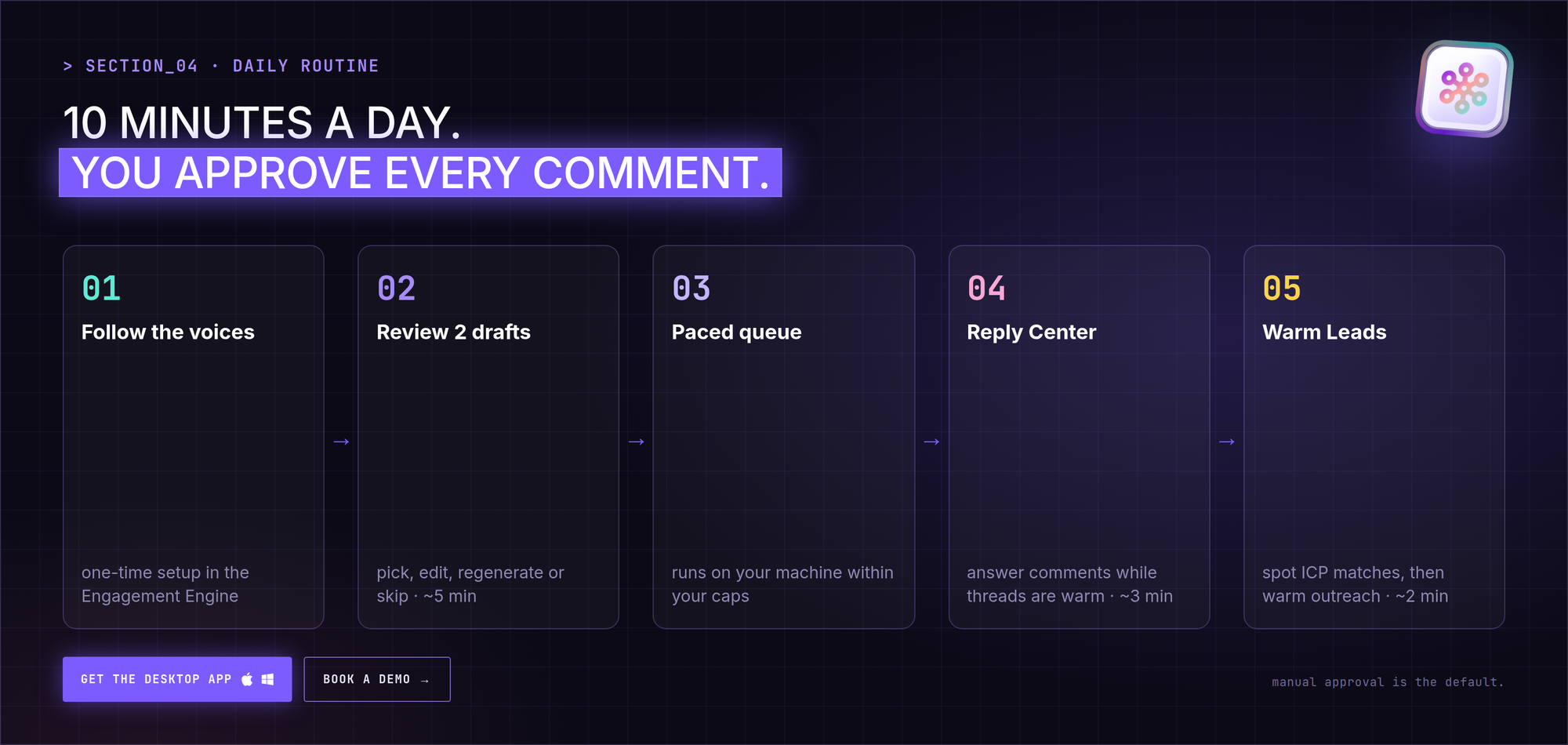
This is the routine we recommend in CrossLike. The Engagement Engine does the searching and drafting; you keep the judgment.
Step 1: Follow the voices that matter (one-time setup)
In the Engagement Engine, add the creators and voices your buyers already read. CrossLike watches for their new posts so you don't have to scroll for them.
Step 2: Review drafted comments (5 minutes)
For every new post from those voices, CrossLike drafts two comment options from the context of the post. You pick one, edit it if you want, regenerate it, or skip the post. Manual approval is the default. There's also an auto-publish mode for when speed matters more than review, but it only runs if you switch it on.
Tell the drafts how you like to comment, for example: "two sentences, my opinion first, then a question, never 'great post'." The clearer the format, the less editing you do.
Step 3: Let the paced queue do the posting
Approved comments don't all fire at once. The CrossLike desktop app queues them on your own machine and runs them at a measured rhythm, within the daily and weekly limits you set. Ten comments spread across a morning looks like a person working. Ten comments in 90 seconds doesn't.
Step 4: Reply under your own posts (3 minutes)
The Reply Center shows every new comment on your posts with its original context and a ready-to-edit reply. Approve, regenerate or skip. A reply while the thread is still warm often restarts the conversation for everyone else too.
Step 5: Check who leaned in (2 minutes)
Warm Leads separates organic interest from community activity and compares each person with your ideal customer profile. When someone who fits your ICP keeps engaging, that's your signal to move to Warm Outreach: a short, paced warm-up, then a connection request and one welcome message you wrote yourself.
Commenting safely: pace, not volume
LinkedIn doesn't publish exact limits, and no tool can truthfully promise to be undetectable. What you can control is behavior that looks human:
- Spread activity out. Concentrated bursts are riskier than the same volume spread over hours.
- Set daily and weekly caps and stay well under them in your first weeks.
- Keep a human in the loop. Review drafts, especially early on, so every comment is something you'd be happy to have your name on.
- Run from your own machine. CrossLike queues and executes work locally in the desktop app, with nothing injected into your browser, rather than bursting activity from a cloud session.
A weekly rhythm that compounds
| When | What | Time |
|---|---|---|
| Every weekday | Approve 8–10 comments from your watchlist | 5 min |
| Every weekday | Reply to new comments in the Reply Center | 3 min |
| Every weekday | Scan Warm Leads for ICP matches | 2 min |
| Twice a week | Publish a post from your CrossLike Content Plan | 20 min |
| Friday | Review which comments earned replies and profile visits; update your watchlist | 10 min |
Commenting builds the familiarity, your posts give new visitors something to read, and Warm Leads tells you when it's time to start a conversation.
FAQ
Is commenting really better than posting on LinkedIn?
When your reach is small, it usually grows your audience faster, because it puts you in front of people who have already gathered on a popular post. Once you have steady reach, the two work best together.
How many comments should I leave per day?
Quality beats volume. Eight to ten thoughtful comments on the right posts is a solid daily target for most people. Spread them out rather than posting them in one burst.
Will commenting at volume get my account restricted?
Concentrated bursts of activity are the bigger risk, not volume by itself. CrossLike paces approved comments through a local queue with daily and weekly caps you set. No tool can guarantee zero risk, and we don't claim to.
Does CrossLike publish comments without my approval?
Not by default. Manual approval is the default for comments and replies. Automatic publishing only runs if you switch it on for a specific workflow, and you see the credit cost before anything is published.
How do I turn commenters into leads?
Reply fast, then use Warm Leads to see which engagers match your ideal customer profile. For the best matches, CrossLike's Warm Outreach runs a short warm-up before a connection request and a welcome message you wrote.