How to Write a LinkedIn Summary: A 4-Part Formula, 5 Examples and 3 Templates
Your LinkedIn About section is where a visitor decides whether to message you. Here's a 4-part formula, five examples by career stage, three fill-in-the-blank templates, and how to make sure the right people actually read it.

Your LinkedIn summary (the About section) is the only place on your profile where you explain, in your own words, who you help and why they should talk to you. Everything else is a label: a title, a list of roles, a set of skills.
It's also mostly hidden. LinkedIn shows the first few lines and tucks the rest behind see more. So the opening has to earn the click, and the rest has to earn the message.
This guide gives you a 4-part formula, five examples for different career stages, three templates you can fill in today, the mistakes that make visitors leave, and how CrossLike helps the right people land on your profile and start a conversation.
Why your About section matters more than it looks
- It's the deciding moment. A visitor who reaches your About section is already interested. This is where they decide to follow, connect, message, or leave.
- It's searchable. The words you use here help LinkedIn match your profile to searches by recruiters and buyers.
- It sets up every follow-up. When you message someone later, the first thing many people do is check your profile. Your About section is your context.
- It works with the rest of your profile. Your photo, banner and headline decide whether people scroll down. Your About section closes the deal.
Write your About section to match your headline and banner. If the banner promises one thing and the About talks about another, visitors lose the thread.
The 4-part formula for a LinkedIn summary
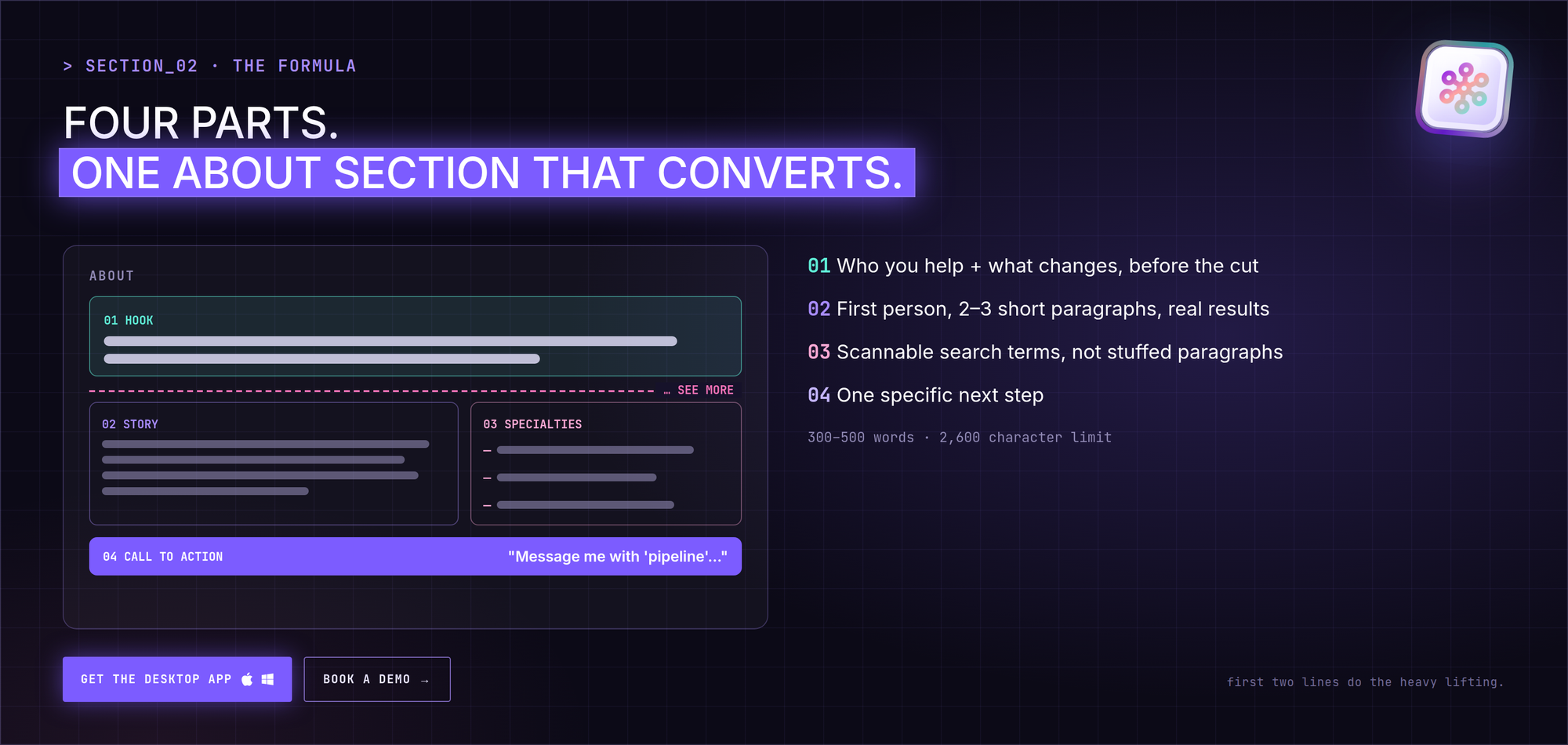
Part 1: The hook (first two sentences)
Say who you help and what changes for them, before the see more cut. No warm-up, no "Welcome to my profile."
Example: "I help B2B SaaS founders turn LinkedIn into their best source of sales conversations. Most come to me when posting feels busy but the inbox stays quiet."
Part 2: The story (2–3 short paragraphs)
In the first person, explain how you got here and what you've learned. Use a result or two instead of adjectives. Short paragraphs, one idea each.
Part 3: Specialties
A short, scannable list of the terms people search for. This keeps keywords out of your paragraphs so the story stays readable:
- Pipeline strategy for early-stage B2B
- LinkedIn content systems
- Founder-led sales
- ICP definition and messaging
Part 4: A clear call to action
Tell people exactly what to do. "Message me with 'pipeline' and I'll send you the checklist we use" works better than "Feel free to reach out."
Length: LinkedIn allows 2,600 characters. Aim for roughly 300–500 words: enough for proof and keywords, short enough to read on a phone.
5 LinkedIn summary examples (and why they work)
These are illustrative examples you can adapt.
1. Student or recent graduate: focus on potential
Marketing graduate who learns by shipping. For my final project I ran a small paid campaign for a local startup and helped grow its monthly sign-ups. I'm looking for a junior growth role where I can test, measure and learn fast.
Why it works: a specific project and a clear goal make up for a short work history.
2. Mid-career professional: focus on outcomes
I help scaling SaaS companies cut churn by fixing customer success workflows. Over eight years I've built support teams from scratch and rolled out ticketing automation that noticeably reduced response times.
Why it works: a clear audience, a clear problem, and results that build trust quickly.
3. Executive: focus on direction
I lead manufacturing organizations through supply chain change built to last. Fifteen years in operations taught me that resilience is designed, not hoped for. Today I'm focused on lower-carbon logistics and developing the next generation of operations leaders.
Why it works: it shows scope and a point of view, not a list of duties.
4. Freelancer or consultant: focus on results for a niche
I run UX audits for healthcare apps that want patients to keep using them. I simplify booking flows and data-heavy screens so people finish what they started. Clients usually see engagement improve within the first quarter.
Why it works: a narrow audience and a concrete problem make the offer obvious.
5. Career changer: focus on trajectory
After ten years teaching secondary school, I'm moving into corporate training and instructional design. Designing lessons for 30 different learners at once turns out to be the best preparation for building remote learning people actually finish.
Why it works: it links the past to the new direction instead of apologizing for it.
3 fill-in-the-blank LinkedIn summary templates
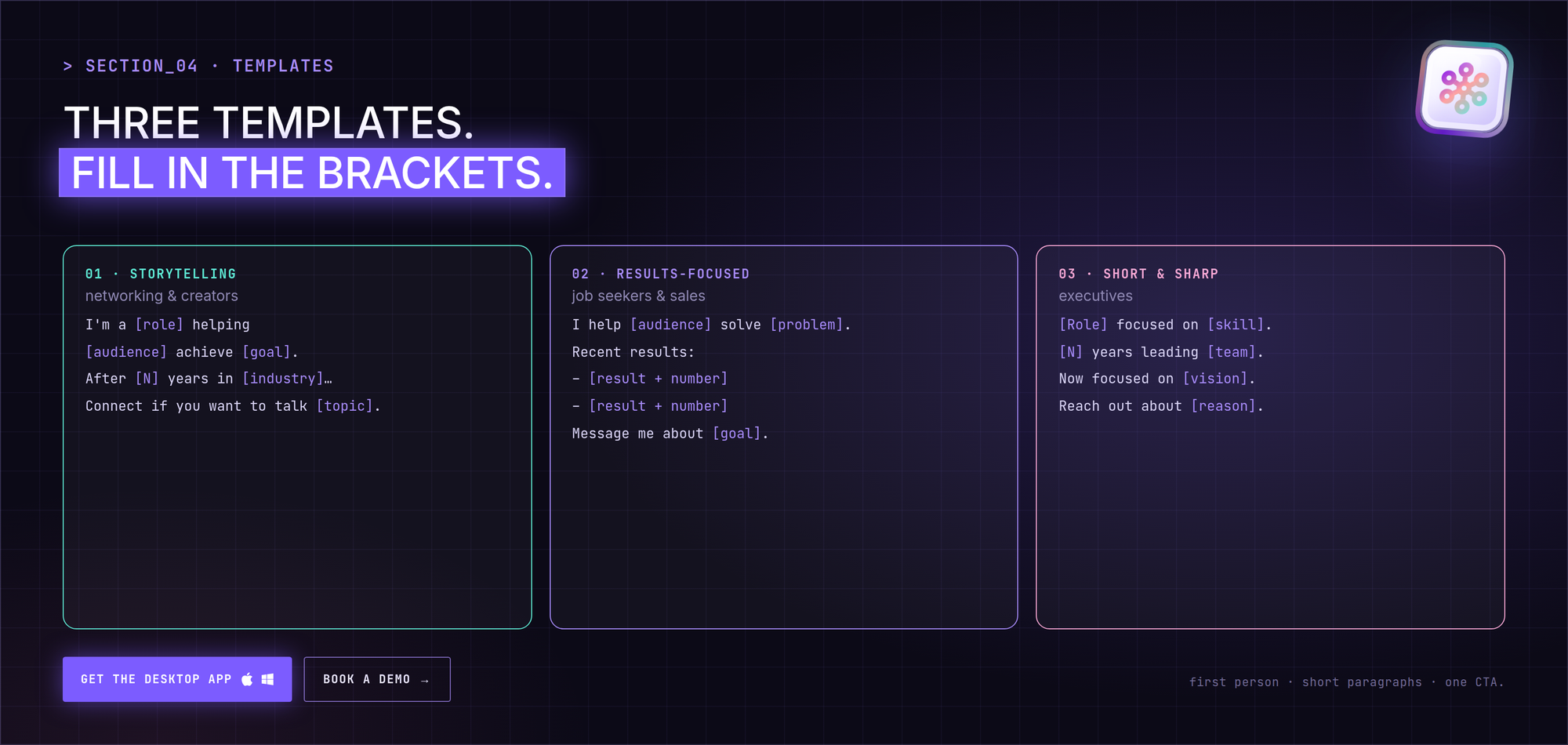
Template 1: Storytelling (best for networking and creators)
I'm a [role] helping [audience] achieve [goal].

After [number] years in [industry], I've learned that [core belief].
My path went from [past role] to [current role], where I focus on [specialty].

Outside work, I care about [value or interest].

Connect with me if you want to talk about [topic] or [topic].
Template 2: Results-focused (best for job seekers and sales)
I help [audience] solve [problem] through [skill or service].

Recent results:
- [Result 1 with a number]
- [Result 2 with a number]
- [Result 3 with a number]

I specialize in [skill A], [skill B] and [skill C].
Message me to talk about how I can help your team reach [goal].
Template 3: Short and sharp (best for executives)
[Role] focused on [major skill] and [major skill].

With [number] years leading [team or company type], I drive [outcome] and [outcome].
Right now I'm focused on [current project or vision].

Reach out about [specific reason] or partnerships.5 LinkedIn summary mistakes to avoid
- Writing in the third person. "She is a seasoned leader…" feels distant. Use "I".
- Pasting your CV. Your experience section already lists roles. Use the About to explain why and how.
- Buzzwords without proof. "Results-driven self-starter" says nothing. One number says more.
- Keyword stuffing in paragraphs. Put search terms in a Specialties list instead.
- A wall of text. Short paragraphs and line breaks make it readable on mobile.
Make sure the right people read it
A great summary only helps if people reach it. And a visitor who reads it and doesn't act is a missed conversation. CrossLike helps on both sides:
- Bring relevant visitors. Comments drafted by the Engagement Engine (you approve each one by default) and posts given early momentum with Boost put your name in front of the people your About section is written for.
- Keep your activity consistent. The weekly Content Plan gives you drafts and hooks built around your chosen outcome, so the posts under your About match what it promises.
- Follow up with context. Warm Leads shows which engagers match your ideal customer profile and which post sparked their interest. Warm Outreach then runs a short, paced warm-up before a connection request and one welcome message you wrote. When they check your profile, your About section explains the rest.
Match your call to action to your follow-up. If your About says "message me about pipeline," your welcome messages and posts should talk about pipeline too.
FAQ
How long should a LinkedIn summary be?
The limit is 2,600 characters. Around 300–500 words is a good target: enough for keywords and proof, still easy to read on a phone.
Should I write my LinkedIn summary in the first or third person?
First person. It reads like a person talking, not a press release.
How do I format line breaks and bullets?
LinkedIn has no rich-text editor in the About section. Use short paragraphs with blank lines between them, and simple hyphens or bullet characters for lists.
What should I write if I have no experience?
Focus on direction and evidence: projects, volunteering, certifications, and what you want to do next. A clear goal plus one real project beats a vague list of traits.
Do recruiters and buyers actually read the About section?
The ones who are interested do, and the words in it help your profile appear in searches. That's why the first two lines, the Specialties list and the call to action matter most.